
Solutions

Quality intelligence at every stage of your inspection maturity.

Loopr replaces inconsistent manual checks and legacy vision systems with Vision AI inspections and captured evidence tied to every unit. Customers often begin with one inspection workflow, expand across lines and plants, then evolve into enterprise Quality Intelligence, with agentic workflows coming next.
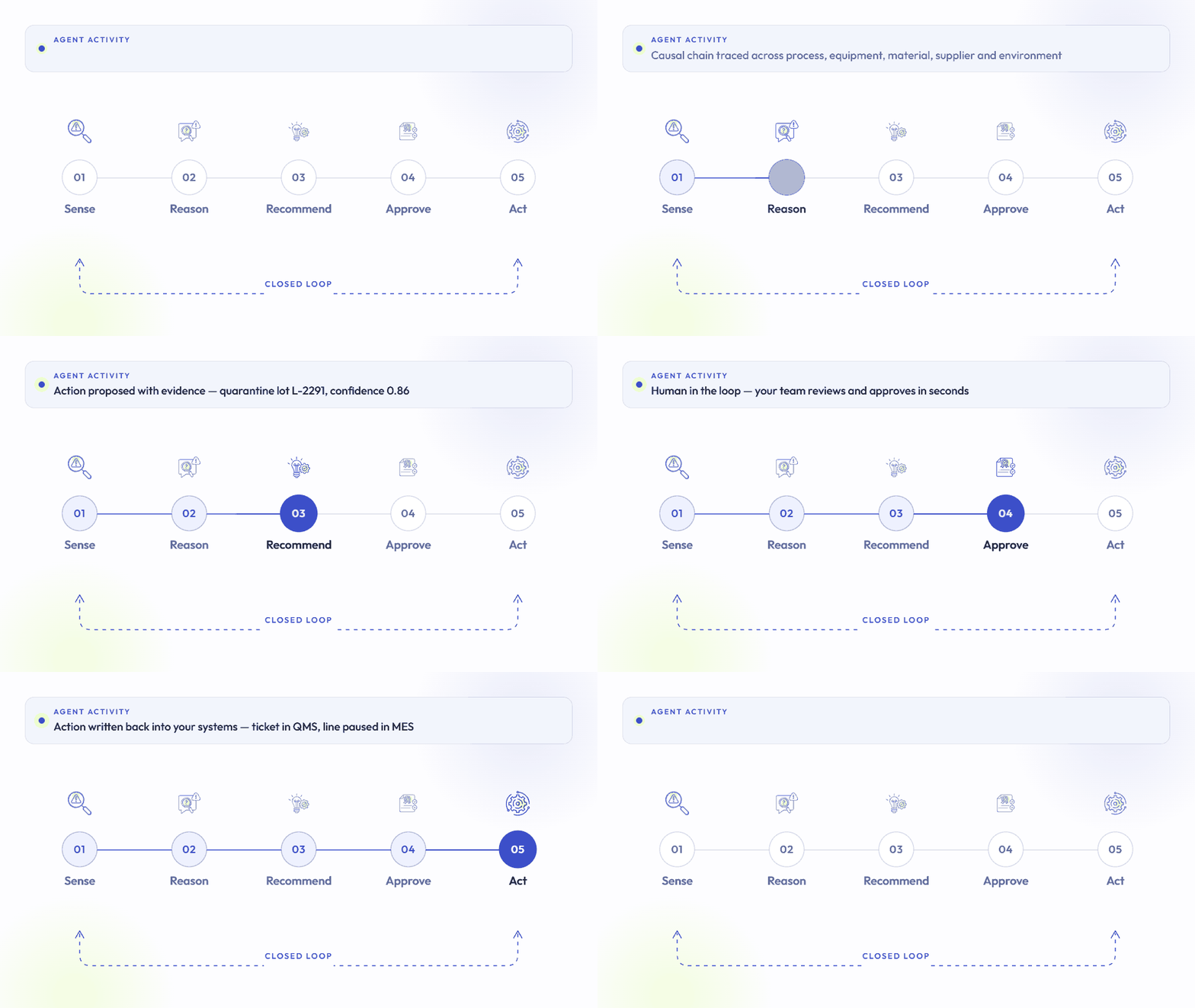
CLOSED LOOP
Digitize → Automate → Visualize → Act
01
Digitization
Loopr Inspect
02
Automation
Loopr Vision AI
03
Visualization
Loopr Quality Intelligence
04
Agentic Workflows (coming soon)
Loopr Manufacturing IQ
01 · Digitization · Loopr Inspect
Digitization
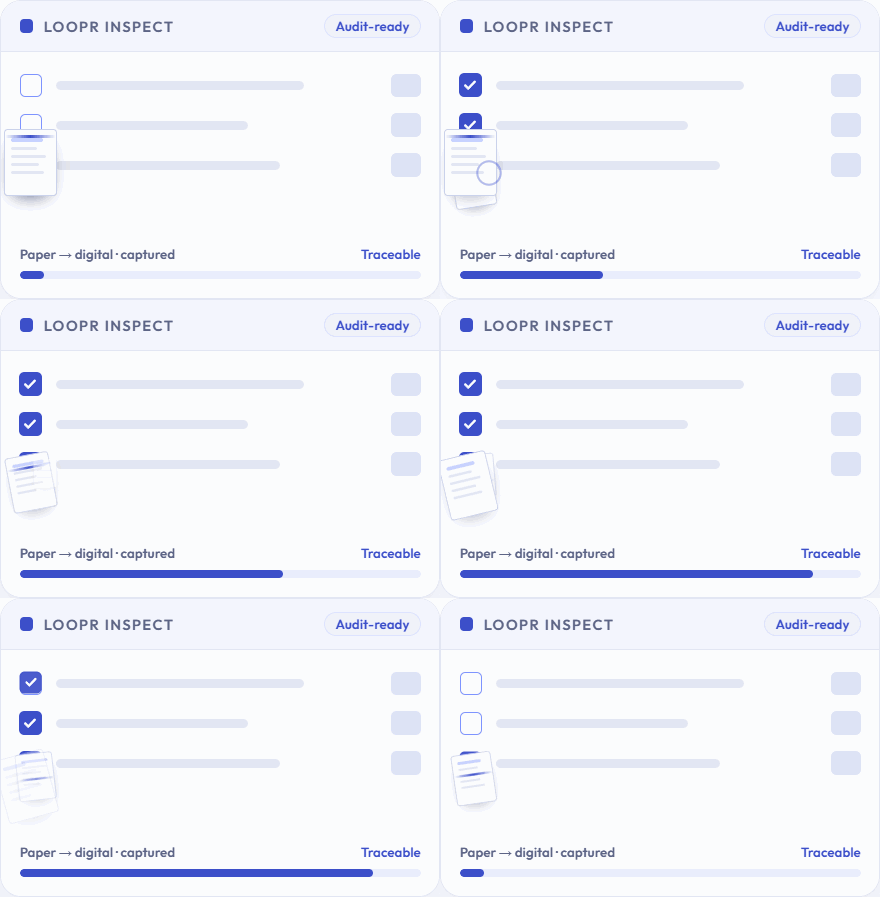
Mobile, guided inspections with visual evidence captured on every unit.
Paper travelers and spreadsheets give way to structured digital inspections on a tablet or fixed station. Every check is documented with images, tied to the part and serial number, and executed the same way on every shift. The record that builds up becomes the training content for Vision AI, so digitizing today is the first step toward automating tomorrow.
KPI
Fewer warranty claims, and faster resolution of the ones you get.
−25%
Warranty claims
10X
Faster warranty claim processing
−30%
Escape defects
Stakeholders
Quality Director
Owns inspection consistency and traceability.
Plant Director
Accountable for escapes and cost of quality.
Warranty & customer service
Needs unit-level evidence to resolve claims.
What's included
01
Guided inspections
Mobile, step-by-step checks that run the same way on every shift.
02
Visual evidence capture
Images captured and labeled at each checkpoint, attached to the record.
03
Per-unit traceability
Every inspection tied to the part, serial number and work order.
04
Audit-ready records
Evidence for a single unit pulled in minutes instead of days.
Case study · Safran
Aerospace · Aircraft galleys
Safran
A photo record for every galley before it ships.
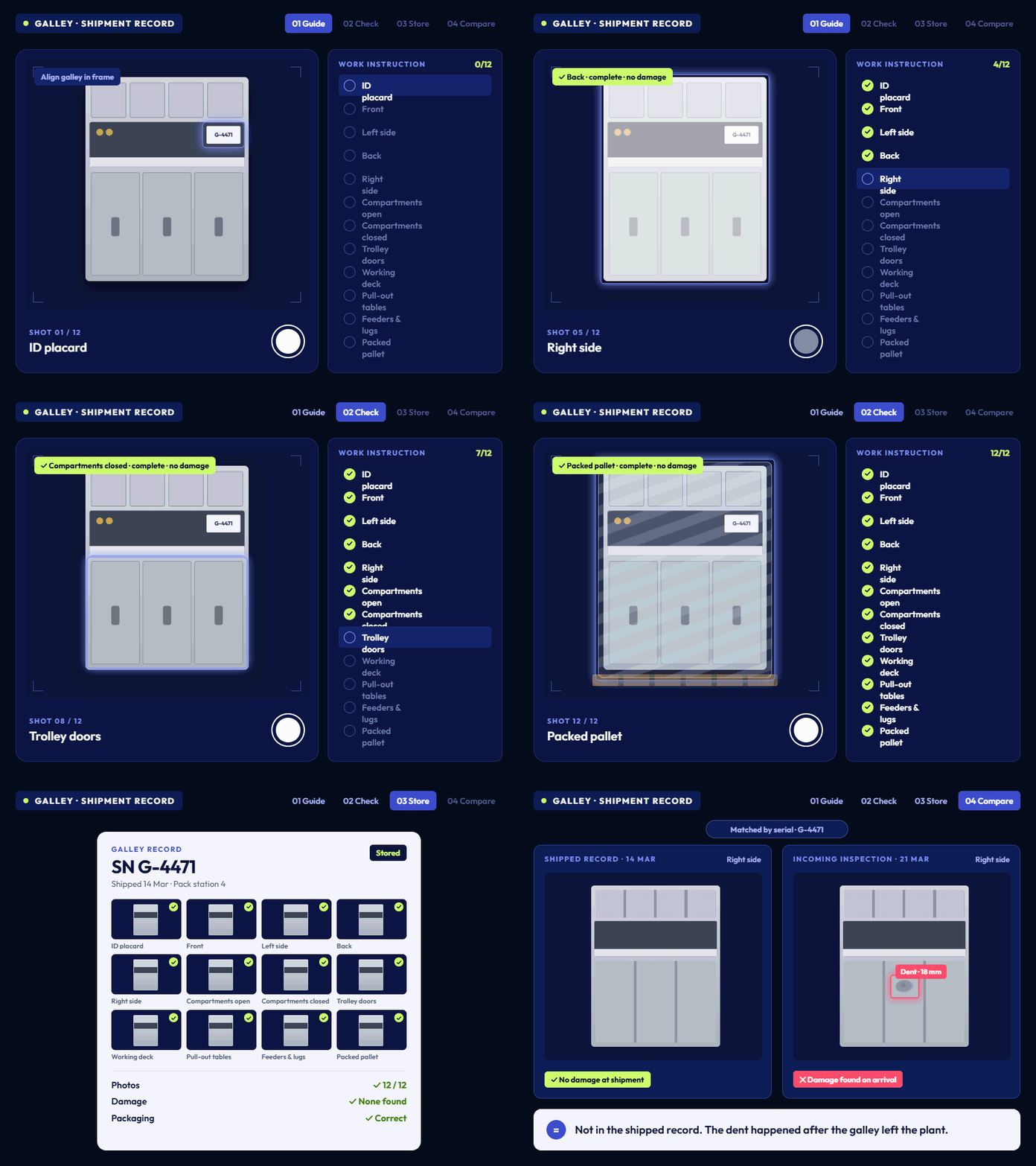
Safran builds aircraft galleys for Boeing and Airbus. Before a galley ships, the team has to photograph it step by step against a work instruction: ID placard, front, left, back and right sides, every compartment and trolley door open and closed, the working deck, pull-out tables, electrical feeders and terminal lugs, and finally the packed pallet with its documents. Loopr guides that capture sequence, checks each photo for damage, completeness and correct packaging, and stores the full set against the galley's serial number. When the galley reaches Boeing's incoming inspection, any damage can be compared with the shipped record, so both sides can see whether it left the plant that way, happened in transit, or occurred after delivery.
Before
Operators took 25 required photos per galley by hand, following a printed work instruction.
Missing or unclear photos were often only noticed after the galley had shipped.
Damage found at the customer's incoming inspection could not be traced to the plant, transit or delivery.
Photo sets were stored without a consistent structure per galley.
After
Loopr guides each capture step, from the ID placard to the packed pallet.
Every photo is checked for completeness, visible damage and correct packaging before sign-off.
The full set is stored against the galley's serial number as digital evidence.
Incoming inspection can compare what arrived with what shipped, and see where any damage happened.
Results
Checked for damage and packaging
Required photos per galley, captured and checked step by step
Every galley
Photo record stored against its serial number
Plant to customer
One condition record from dispatch to incoming inspection
2024
Winner, Safran Explore Flying Experience Program, Visual Inspection
02 · Automation · Loopr Vision AI
Automation
Vision AI inspects every unit at configured stations, consistently.
Loopr combines automated Vision AI checks with human-led inspections, using your error classes and business rules to decide pass, rework or scrap. Checks adapt to each unique BOM or order. Run fully autonomous with fixed cameras, or keep a human in the loop on a mobile device. Loopr is hardware agnostic and works with IP, thermal and microscope-mounted cameras.
KPI
Lower rework and scrap cost by catching defects at the source.
−10%
Rework
−10%
Scrap
+20%
Inspection efficiency
Stakeholders
Quality Director
Champions consistent, objective inspection.
Manufacturing Engineering
Owns the line, stations and rework loop.
VP Operations
Approves budget against rework and scrap cost.
Use case
Assembly checks in heavy equipment
Challenge
High-mix forklift attachments require verification of multiple components. Manual inspection is slow, expensive and error-prone, and escapes lead to warranty or liability claims.
Solution
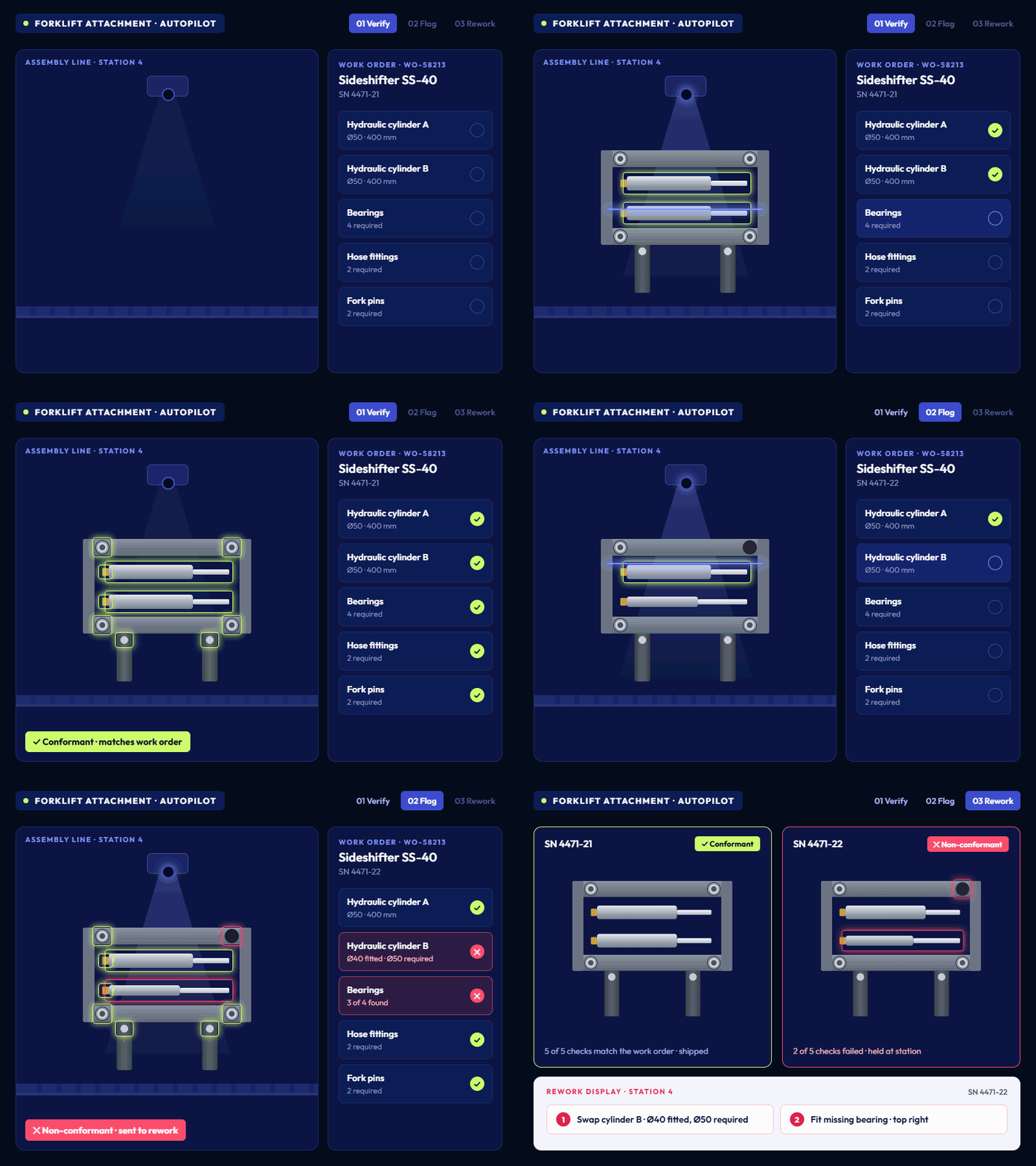
Loopr runs in autopilot mode on the line. Cylinders, bearings and other components are checked against work orders in real time, and incorrect assemblies are flagged on a rework display.
Outcome
In-line inspection reduces rework cost and defect escapes, improves traceability of shipped parts, and lowers the cost of inspection.
How it works
01
Train on your parts
Models learn from your own images and CAD. A castle nut model was trained on four videos, three of them synthetic.
02
Run in co-pilot
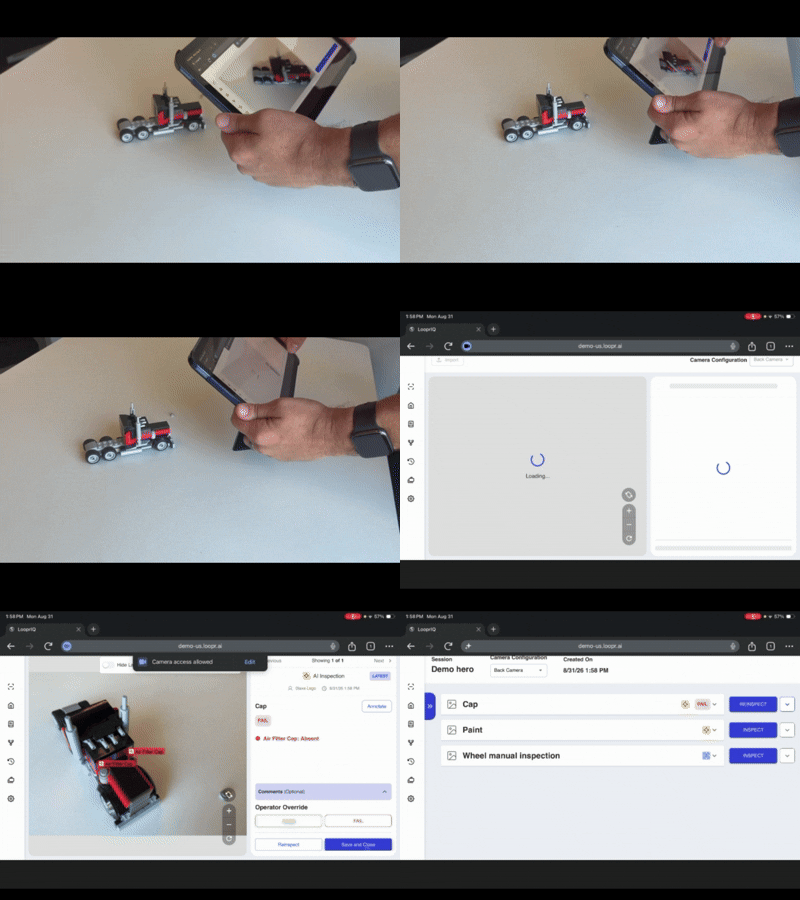
Operators inspect with a tablet and step in when needed, annotating results in the app to improve the model.
03
Move to autopilot
Fixed cameras inspect every unit in-line at configured stations, checked against the BOM or work order for that build.
Cascade Corp
“Since we adopted Loopr's system, we've achieved 100% inspection accuracy.”
Chad Dole, Director of Operations, North America, Cascade Corp
100%
Inspection accuracy
15 → 60
Parts per hour, micro weld inspection
What you need to start
Loopr uses the infrastructure you already have. A pilot starts with one inspection hotspot on one line.
Existing cameras or tablets
Sample part images or CAD
ERP BOMs for adaptive checks
One line to pilot
Common questions
Which cameras does Loopr work with?
Any input source, including IP cameras, thermal cameras and microscope-mounted cameras, on fixed stations or tablets.
How much data do we need to train?
Less than you'd expect. Synthetic data from 3D CAD can supplement real footage.
What happens when the model is unsure?
In co-pilot mode the operator reviews and decides. Their feedback feeds back into model training.
03 · Visualization · Loopr Quality Intelligence
Visualization
From inspections to trends to decisions.
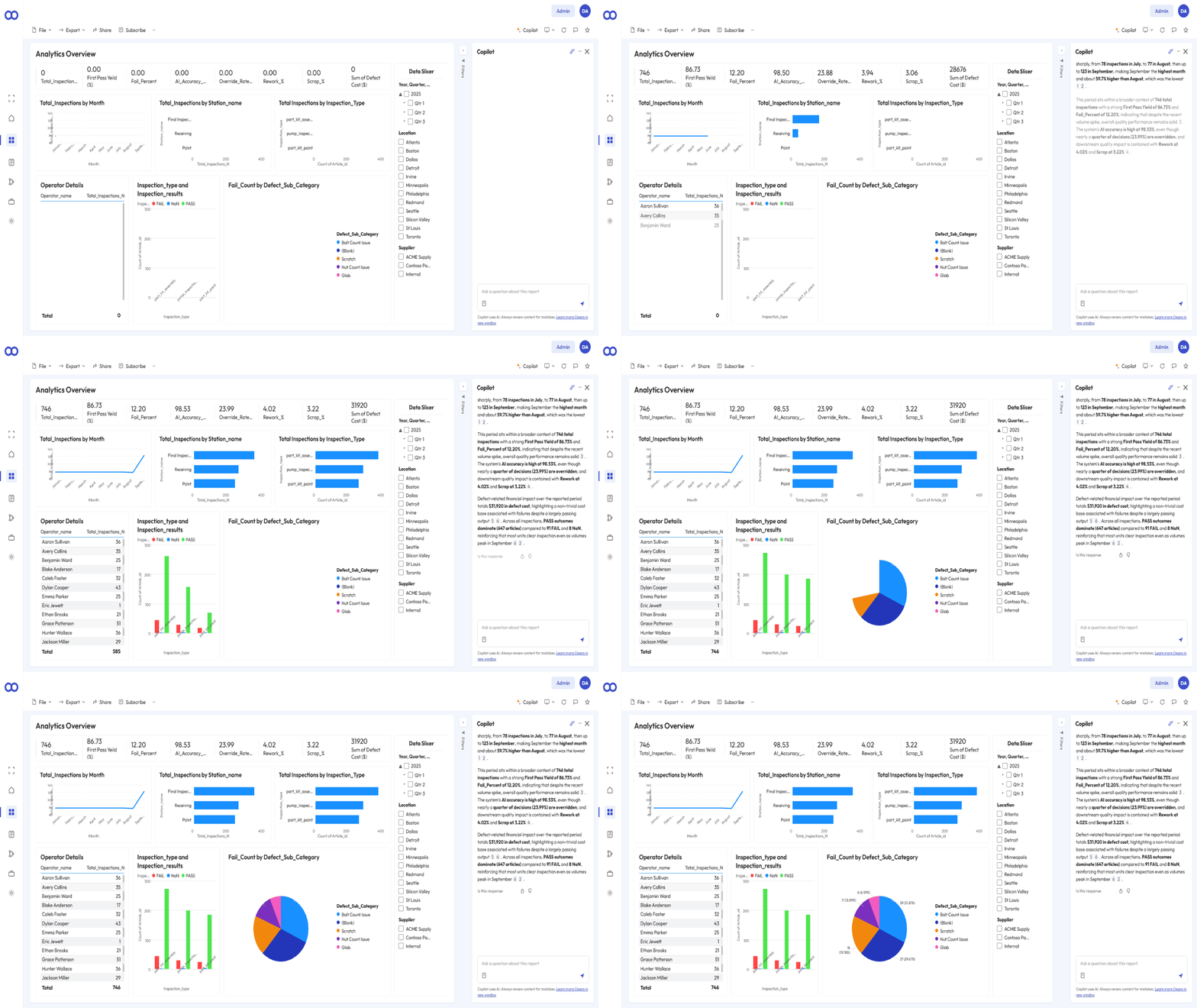
Every inspection from every line flows into one place. Loopr Quality Intelligence turns that data into quality dashboards, defect trending and cross-site benchmarking in Microsoft Fabric and Power BI, with Copilot for natural-language questions. Loopr sits alongside your MES and PLCs: MES tells you what was built, the PLC tells you how production ran, and Loopr tells you whether it was built correctly.
Dashboard · Quality Intelligence
KPI
Higher overall efficiency on the factory floor.
−20%
Operational cost
+10%
Production capacity
$5M+
First-year savings, truck plant
Stakeholders
Plant Director
Owns throughput and floor efficiency.
VP Operations
Compares performance across plants.
CIO / IT
Approves the Fabric and data platform.
Use case
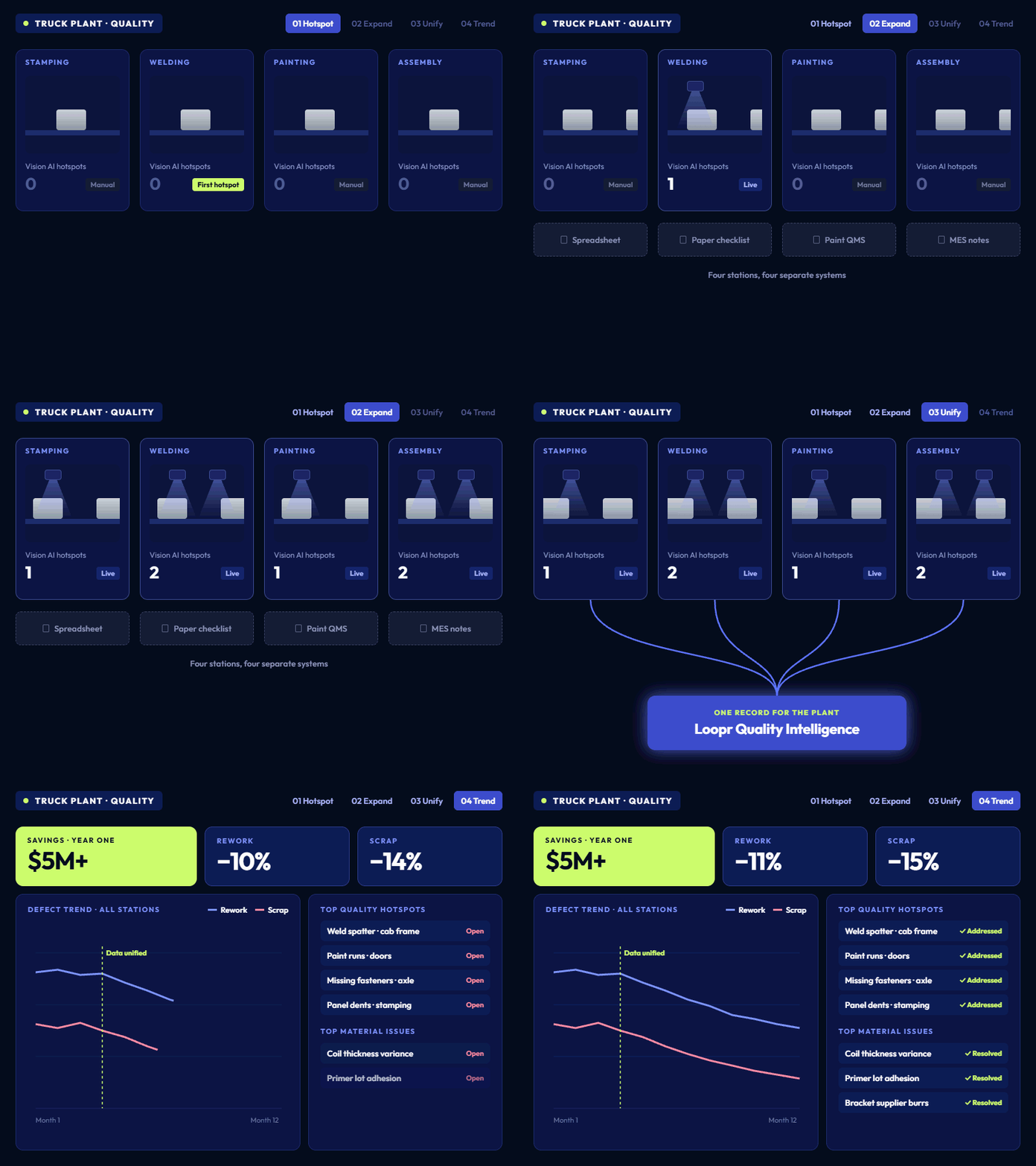
Quality intelligence across a truck plant
Challenge
Quality data was captured at stamping, welding, painting and assembly, but in separate systems. Recurring hotspots and material issues were hard to see and prioritize.
Solution
Loopr started with one Vision AI hotspot, expanded to multiple hotspots, then unified inspection data into Quality Intelligence to trend defects across the plant.
Outcome
More than $5M in savings in the first year. Rework down 11%, scrap down 15%, the top four quality hotspots addressed and the top three material issues resolved.
How it works
01
Ingest and secure
Images and inspection records from every station are stored as structured, traceable data.
02
Analyze and trend
Defects are trended by line, shift, supplier and plant, with alerts on negative trends.
03
Decide with Copilot
Dashboards in Power BI and natural language queries in Copilot, with managers notified automatically.
Large truck manufacturer
One hotspot expanded to plant-wide Quality Intelligence, with results in the first year.
Loopr deployment · customer name withheld
$5M+
Savings, first year
−15%
Scrap
04 · Agentic Workflows · Coming soon
Agentic Workflows
Defect detection finds the problem. Agentic AI will explain it.
Detection alone leaves engineers asking why a defect is happening and how to stop it. Without help, they spend hours or days investigating each spike across siloed systems. Loopr's Process Reasoning Agent, currently in development, is designed to trace every upstream factor when a defect rate spikes, score the evidence, and draft a root cause report with recommended actions for an engineer to review and approve.
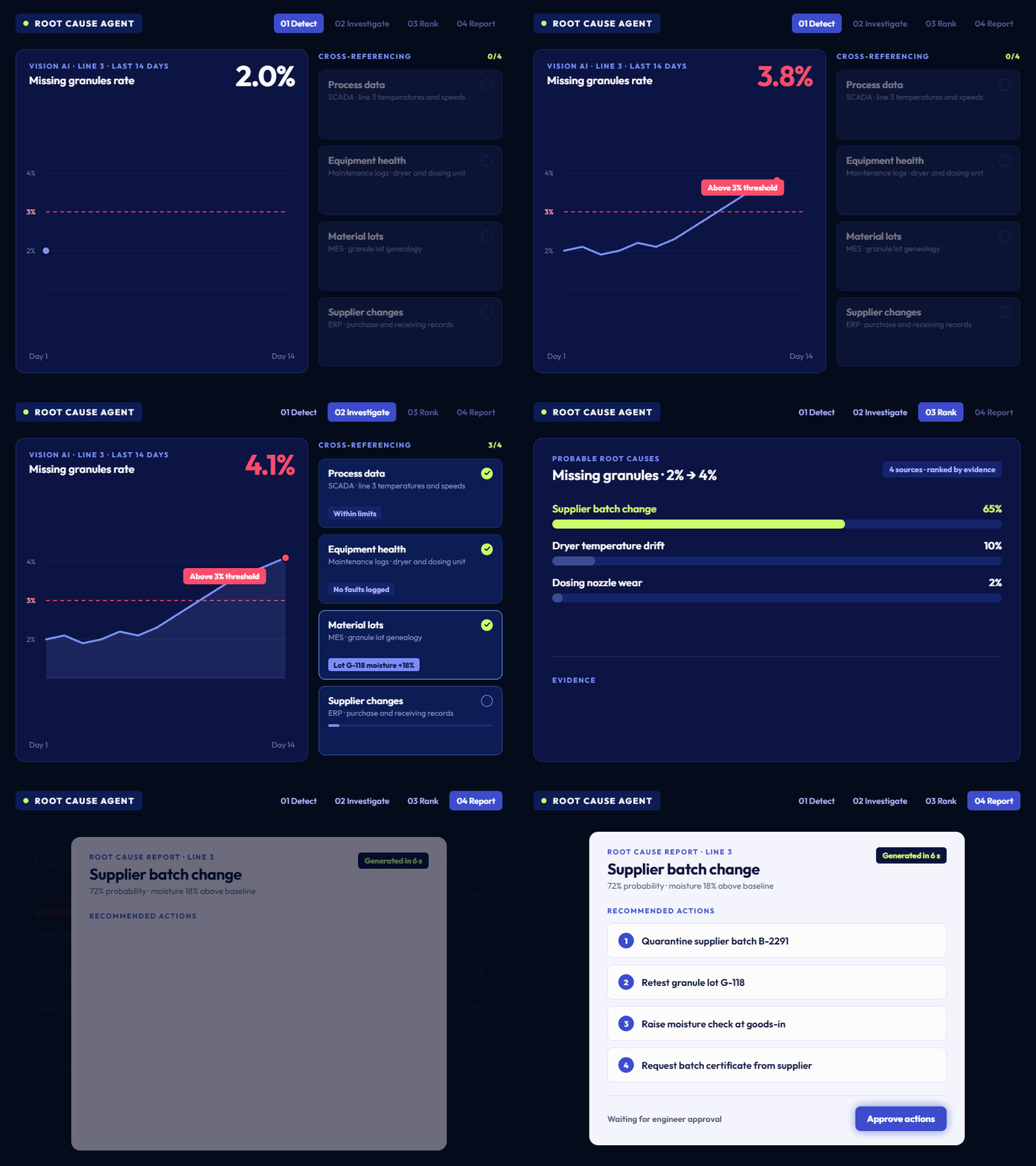
RCA agent output · ranked causes
KPI
Designed to shorten the time from defect spike to root cause and corrective action.
Seconds
Spike to root cause report, target
72%
Top cause confidence, example
4
Recommended actions, example
Stakeholders
Manufacturing Engineering
Investigates and fixes process issues.
Quality Director
Approves root cause and corrective action.
Head of Innovation / CIO
Sponsors enterprise AI and agent adoption.
Use case
Process Reasoning & RCA Agent
Root cause for a missing-granules spike
Challenge
Vision AI detected missing granules rising from 2% to 4%, above a 3% threshold. Finding the cause manually would mean checking SCADA, maintenance logs, supplier records and SOPs one by one.
Solution
In this illustrative example, the agent cross-references process data, equipment health, material lots and supplier changes, and ranks a supplier batch change at 72% probability, citing an ERP log and moisture 18% above baseline.
Outcome
A root cause report with four recommended actions, including quarantining the batch and retesting the granule lot, designed to be produced in seconds for engineer approval.
How it works
01
Defect trigger
Vision AI detects a defect rate spike above threshold.
02
Trace upstream
The agent will check process deviation, equipment failure, material variation and supplier or recipe changes.
03
Rank and recommend
Evidence will be scored into ranked causes and recommended actions, then sent for human review.
RCA agent output
Designed to take a defect spike to a root cause report in seconds.
Illustrative output, Process Reasoning & RCA Agent (in development)
72%
Top cause: supplier batch change
4
Recommended actions
Who uses it
Agent output is advisory, never autonomous. Engineers validate the root cause, evidence and actions before anything is dispatched.
Human review and approval
Evidence cited per cause
Humans retain override
Explainable recommendations
Common questions
Can the agent act without approval?
No. Every recommendation goes through human review before actions are dispatched.
What data does it reason over?
It’s being designed to reason over Vision AI defects, SCADA and historian data, ERP, CMMS and MES, PLC data where integrated, plus your SOPs, specs and past RCA reports.
What is available today?
Defect detection and classification run in production today. Root cause and corrective action agents are in development.

Start Your Quality Solution

Whether you're deep into a failed audit, an ERP/MES upgrade, or just tired of being told to “do something with AI,” the real first step is the same: structure the data. Let's talk about what that looks like on your floor.

Start Your Quality Solution

Whether you're deep into a failed audit, an ERP/MES upgrade, or just tired of being told to “do something with AI,” the real first step is the same: structure the data. Let's talk about what that looks like on your floor.